Fortinet NSE4_FGT_AD-8.0 dumps - in .pdf

- Exam Code: NSE4_FGT_AD-8.0
- Exam Name: Fortinet NSE 4 - FortiOS 8.0 Administrator
- Updated: Nov 27, 2026
- Q & A: 99 Questions and Answers
- PDF Price: $59.99
- Free Demo
Fortinet NSE4_FGT_AD-8.0 Value Pack
(Frequently Bought Together)

Online Test Engine supports Windows / Mac / Android / iOS, etc., because it is the software based on WEB browser.
- Exam Code: NSE4_FGT_AD-8.0
- Exam Name: Fortinet NSE 4 - FortiOS 8.0 Administrator
- Updated: Nov 27, 2026
- Q & A: 99 Questions and Answers
- PDF Version + PC Test Engine + Online Test Engine
- Value Pack Total: $119.98 $79.99
- Save 50%
Fortinet NSE4_FGT_AD-8.0 dumps - Testing Engine

- Exam Code: NSE4_FGT_AD-8.0
- Exam Name: Fortinet NSE 4 - FortiOS 8.0 Administrator
- Updated: Nov 27, 2026
- Q & A: 99 Questions and Answers
- Software Price: $59.99
- Testing Engine
About Fortinet NSE4_FGT_AD-8.0 Exam braindumps
Certification vendors revise their exams regularly, and ValidTorrent revises its NSE4_FGT_AD-8.0 materials just as often. Your purchase of 99 practice questions for the Fortinet NSE 4 - FortiOS 8.0 Administrator includes 365 days of free updates through 2026 and beyond.
Fortinet NSE4_FGT_AD-8.0 Exam Overview:
| Certification Vendor: | Fortinet |
|---|---|
| Exam Name: | Fortinet NSE 4 - FortiOS 8.0 Administrator |
| Exam Number: | NSE4_FGT_AD-8.0 |
| Exam Format: | Operational scenarios, Troubleshooting scenarios, Configuration-based questions, Drag-and-drop, Multiple-choice |
| Available Languages: | English |
| Certificate Validity Period: | 2 years |
| Exam Duration: | 100 minutes |
| Exam Price: | Not publicly specified; check Pearson VUE for regional pricing |
| Real Exam Qty: | 50-60 |
| Passing Score: | Pass or fail; numerical passing score not publicly disclosed |
| Related Certifications: | NSE 4 FortiOS |
| Recommended Training: | FortiOS 8.0 Administrator Self-Paced Training Fortinet Training Institute FortiOS 8.0.0 Administration Guide |
| Exam Registration: | Fortinet Training Institute - Exam Information Pearson VUE - Fortinet Exam Registration |
| Sample Questions: |  |
| Exam Way: | Proctored examination available at Pearson VUE testing centers or remotely through OnVUE online proctoring. The FortiOS 8.0 exam is currently listed as Coming Soon on the official Fortinet exam page. |
| Pre Condition: | No formal prerequisite exam is required to take the NSE 4 technical exam. Fortinet recommends 1-2 years of networking experience, 0-1 year of network security experience, and at least 6 months of hands-on FortiGate experience. |
| Official Syllabus URL: | https://training.fortinet.com/local/staticpage/view.php?page=fortios_administrator_exam |
Fortinet NSE4_FGT_AD-8.0 Exam Syllabus Topics:
| Section | Weight | Objectives |
|---|---|---|
| Firewall policies and authentication | 20-25% | - Network address translation
|
| Routing | 10-15% | - Static routing
|
| Content inspection | 25-30% | - Security profiles and threat prevention
|
| VPNs | 10-15% | - VPN monitoring and troubleshooting
|
| Deployment and system configuration | 25-35% | - Logging, monitoring, and troubleshooting
|
Common Questions About the Fortinet NSE4_FGT_AD-8.0 Exam
The Fortinet NSE 4 - FortiOS 8.0 Administrator is the official Fortinet exam that leads to the NSE 4 FortiOS certification at the NSE 4 level. Passing it validates your skills against Fortinet standards and proves your qualification to current and future employers. The credential is also connected with related certifications such as NSE 4 FortiOS, so it can serve as a solid step in a broader certification path.
The NSE4_FGT_AD-8.0 exam has 50-60 questions in total and must be completed within 100 minutes. That leaves only a narrow time budget per item, so train yourself to flag a difficult question, move on, and circle back later instead of getting stuck. A week or two before your test date, run at least one full timed mock exam in the ValidTorrent desktop or online test engine under the same 100 minutes limit, and repeat until you can finish with a few minutes left for review.
The passing score for the NSE4_FGT_AD-8.0 exam is Pass or fail; numerical passing score not publicly disclosed, and the official registration fee is Not publicly specified; check Pearson VUE for regional pricing. Keep in mind that a failed attempt is not discounted — retaking the exam means paying the full fee again — so it is wise not to book your seat until your practice scores sit comfortably above the passing mark. Working through the 99 questions at ValidTorrent in timed mode is a reliable way to judge when you are truly ready.
Fortinet sets the following requirement for the NSE4_FGT_AD-8.0 exam: No formal prerequisite exam is required to take the NSE 4 technical exam. Fortinet recommends 1-2 years of networking experience, 0-1 year of network security experience, and at least 6 months of hands-on FortiGate experience.. Eligibility rules can change from time to time, so always confirm the current prerequisites on the official exam page at https://training.fortinet.com/local/staticpage/view.php?page=fortios_administrator_exam before you register.
You can register for the Fortinet NSE 4 - FortiOS 8.0 Administrator through the following official channels:
The NSE4_FGT_AD-8.0 exam is delivered as Proctored examination available at Pearson VUE testing centers or remotely through OnVUE online proctoring. The FortiOS 8.0 exam is currently listed as Coming Soon on the official Fortinet exam page., so review the technical and check-in requirements for that format when you schedule your appointment.
Fortinet recommends the following official training options for the Fortinet NSE 4 - FortiOS 8.0 Administrator:
- FortiOS 8.0 Administrator Self-Paced Training
- Fortinet Training Institute
- FortiOS 8.0.0 Administration Guide
Official courses build the theory, and pairing them with the 99 practice questions from ValidTorrent turns that knowledge into exam-ready answers.
Yes. ValidTorrent offers a free PDF demo for the Fortinet NSE 4 - FortiOS 8.0 Administrator, so you can review real sample questions and judge the quality before paying anything. After your purchase, you receive 365 days of free updates — whenever the question pool changes, you get the latest version at no cost. Once that period expires, you can extend your update service at a 50% discount from your member zone.
If you take the NSE4_FGT_AD-8.0 exam within 60 days of your purchase and do not pass, you can apply for a full refund under our 100% Money Back Guarantee. To qualify, submit a scanned copy of your exam enrollment slip together with your official Score Report (PDF) within 2 days after the exam date, and your claim will be processed within 7 days. Note that the guarantee applies only to the corresponding exam: attempts taken within 3 days of purchase, downloaded-but-unused materials, free resources, and expired orders are not eligible, and the candidate name must match the purchaser name. If you would rather not refund, you can exchange the product for two free exam products of equal value while keeping the update service on your original purchase.
Delivery is instant: your files are available to download right after payment and are also sent to your email within one minute. If nothing arrives within 2 hours, contact our support team (and check your spam folder first). There is no limit on the number of computers you can install the product on.
The Fortinet NSE 4 - FortiOS 8.0 Administrator is organized into 5 domains. Among the first ones are Deployment and system configuration (25-35%), Routing (10-15%), Firewall policies and authentication (20-25%), and the remaining domains cover the rest of the official objectives. For the complete topic breakdown with every subtopic, see the full NSE4_FGT_AD-8.0 exam outline above on this page.
Fortinet NSE 4 - FortiOS 8.0 Administrator Sample Questions:
Original source entry: 76 * Antivirus over HTTPS
Exhibits:
You are asked to implement an antivirus profile for files downloaded through FTP, HTTP, and HTTPS.
While testing, you are successful with HTTP and FTP protocols, but FortiGate does not block the file download over HTTPS.
What could be the cause?
Exhibit 1 - Source configuration / network evidence
- A. The action on the firewall policy is not set to deny.
- B. The feature set in the antivirus profile is not set to Flow-based.
- C. The SSL inspection mode in the firewall policy is not deep content inspection.
- D. Web filter is not enabled on the firewall policy to complement the antivirus profile.
Correct Answer: C 🗳️
Explanation: Only visible for ValidTorrent members. You can sign-up / login (it's free).
Original source entry: 88 * IKEv1 Phase 1
Refer to the exhibit.
A network administrator is troubleshooting an IPsec tunnel between two FortiGate devices. The administrator has determined that phase 1 failed to come up. The administrator has also re-entered the pre-shared key on both FortiGate devices to make sure they match.
Based on the phase 1 configuration and the diagram shown in the exhibit, which two configuration changes can the administrator make to bring phase 1 up? (Choose two.)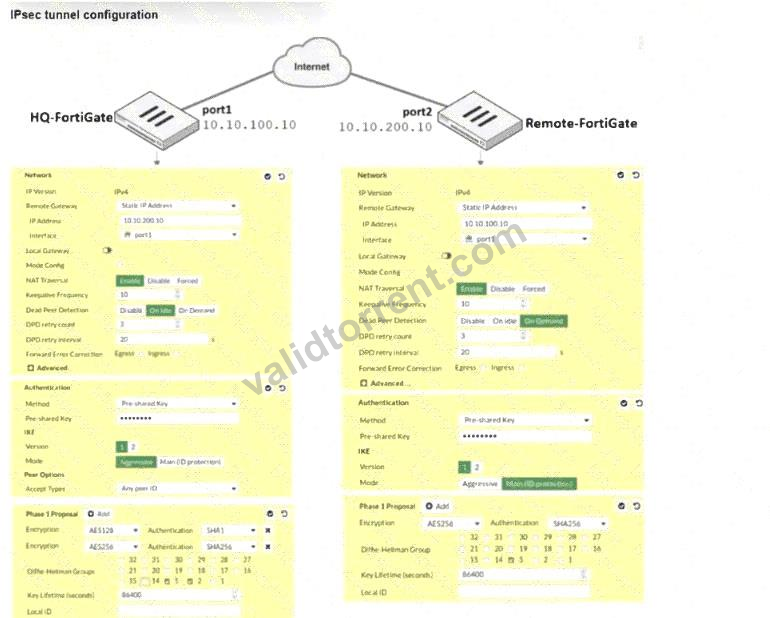
Exhibit 1 - Source configuration / network evidence
- A. On HQ-NGFW, disable Diffie-Hellman group 2.
- B. On both FortiGate devices, set Dead Peer Detection to On Demand.
- C. On HQ-NGFW, set IKE mode to Main (ID protection).
- D. On BR1-FGT, set port2 to Interface.
Correct Answer: C,D 🗳️
Explanation: Only visible for ValidTorrent members. You can sign-up / login (it's free).
Refer to the exhibit.
The NOC team connects to the FortiGate GUI with the NOC_Access admin profile. They request that their GUI sessions do not disconnect too early during inactivity. What must the administrator configure to answer this specific request from the NOC team?
Exhibit 1 - Source configuration / network evidence
- A. Move NOC_Access to the top of the list to ensure all profile settings take effect.
- B. increase the of line value of the override idle Timeout parameter in the NOC_Access admin profile.
- C. Increase the admintimeout value under config system accprofile noc Access.
- D. Ensure that all NOC_Access users are assigned the super_admin role to guarantee access.
Correct Answer: B 🗳️
Explanation: Only visible for ValidTorrent members. You can sign-up / login (it's free).
Refer to the exhibits.
The exhibits show the application sensor configuration and the Excessive-Bandwidth and Apple filter details.
Based on the configuration, what will happen to Apple FaceTime if there are only a few calls originating or incoming? (Choose one answer)
Exhibit 1 - Source configuration / network evidence
- A. Apple FaceTime will be allowed, based on the Apple filter configuration.
- B. Apple FaceTime will be blocked, based on the Excessive-Bandwidth filter configuration.
- C. Apple FaceTime will be allowed only if the Apple filter in Application and Filter Overrides is set to Allow.
- D. Apple FaceTime will be allowed, based on the Video/Audio category configuration.
Correct Answer: B 🗳️
Explanation: Only visible for ValidTorrent members. You can sign-up / login (it's free).
A network administrator has enabled full SSL inspection and web filtering on FortiGate. When visiting any HTTPS websites, the browser reports certificate warning errors. When visiting HTTP websites, the browser does not report errors.
What is the reason for the certificate warning errors?
- A. The certificate used by FortiGate for SSL inspection does not contain the required certificate extensions.
- B. The browser does not trust the certificate used by FortiGate for SSL inspection.
- C. The matching firewall policy is set to proxy inspection mode.
- D. The option invalid SSL certificates is set to allow on the SSL/SSH inspection profile.
Correct Answer: B 🗳️
Explanation: Only visible for ValidTorrent members. You can sign-up / login (it's free).
Viewing page 1 out of 20 pages.
Viewing questions 1-5 out of 99 questions.
Over 68124+ Satisfied Customers
Related Exams
What Clients Say About Us
Security & Privacy
We respect customer privacy. We use McAfee's security service to provide you with utmost security for your personal information & peace of mind.
365 Days Free Updates
Free update is available within 365 days after your purchase. After 365 days, you will get 50% discounts for updating.
Money Back Guarantee
Full refund if you fail the corresponding exam in 60 days after purchasing. And Free get any another product.
Instant Download
After Payment, our system will send you the products you purchase in mailbox in a minute after payment. If not received within 2 hours, please contact us.